Best Way to Learn Snapseed Fast: Master Editing Like a Pro
Blog
Snapseed is one of the most powerful and free photo editing apps available today, but many beginners struggle to use it efficiently. Learning the app the right way can save time and dramatically improve your edits. From understanding basic tools like crop and white balance to exploring advanced features such as selective adjustments and Snapseed QR Codes, a structured approach makes a huge difference. Practicing regularly, analyzing preset edits, and experimenting with your own style is the fastest way to become confident in Snapseed. In this guide, we’ll explore the best methods to learn Snapseed effectively.
Pro Tips to Learn Snapseed Quickly
- Start with cropping, straightening, and adjusting white balance before any creative edits.
- Use Snapseed QR Codes to see how presets are built and apply them for practice.
- Explore selective edits to understand local adjustments on brightness, contrast, and saturation.
- Avoid overusing filters; subtle edits often look more professional.
- Regularly experiment with tools like Healing and Brush to gain full control.
Quick Snapseed Guide for Beginners
1. Start With the Basics
Begin your editing journey by cropping, straightening, and adjusting the white balance. These simple steps create a strong foundation for all other edits.
2. Explore Essential Tools
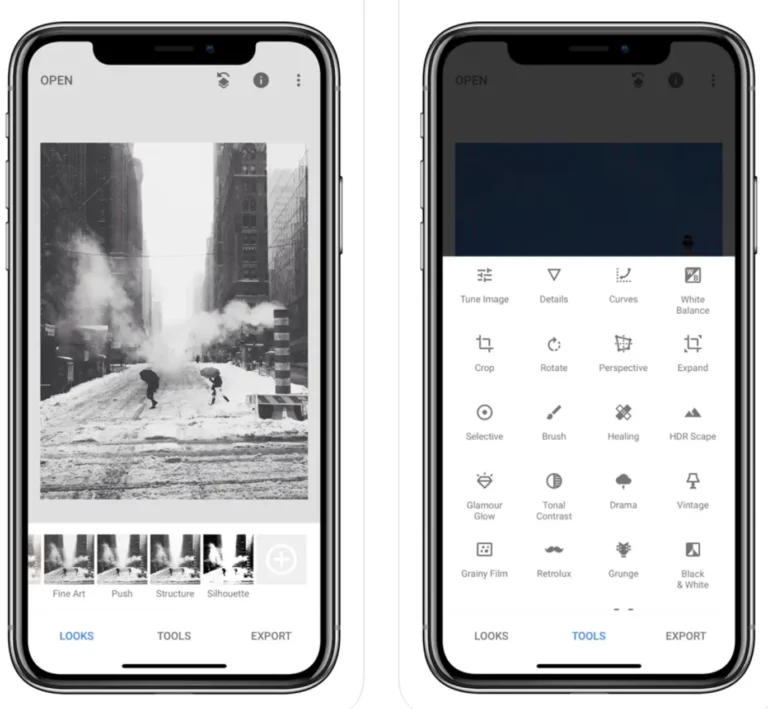
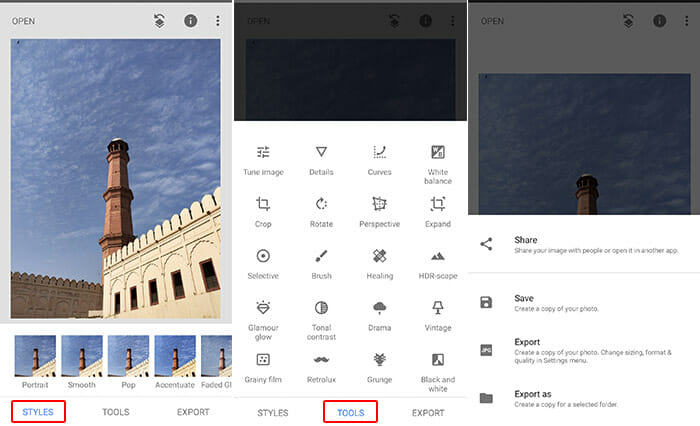
Use Tune Image, Details, Healing, and Brush to enhance photos. These tools give you precise control and let you fix small imperfections quickly.
3. Try Selective Editing
Instead of editing the whole photo, use the Selective tool to adjust brightness, contrast, or saturation in specific areas. This creates professional-looking results.
4. Learn From Snapseed QR Codes
Apply QR presets to see how edits are built. Studying these can help you understand professional techniques and save time on future edits.
5. Keep Edits Subtle
Avoid over-editing. Light adjustments usually look more natural and visually appealing than heavy filters or sharpness.
Snapseed Learning Tips Table
| Tip | Tool / Feature | Benefit |
|---|---|---|
| Start with basic corrections | Crop, Straighten, White Balance | Sets a solid foundation for edits |
| Enhance details | Tune Image, Brush, Healing | Adds precision and fixes imperfections |
| Targeted adjustments | Selective Tool | Adjust specific areas for better control |
| Learn from presets | Snapseed QR Codes | Saves time and teaches professional techniques |
| Export correctly | High Resolution Export | Maintains quality and clarity |
Snapseed Beginner Guide: Essential Tips for Fast Learning
Learning Snapseed is easy if you follow a structured approach. Start with basic tools like crop, straighten, and white balance to set a strong foundation. Explore essential tools such as Tune Image, Healing, and Brush to enhance photos with precision. Use the Selective tool to adjust specific areas instead of editing the whole image for better control. Snapseed QR Codes are great for applying presets and learning professional editing techniques. Keep your edits subtle to maintain natural-looking photos and always export in high resolution. Practicing regularly helps beginners become confident quickly.
FAQs
Is Snapseed easy for beginners
Yes, Snapseed is very beginner-friendly with a clean interface. It guides users step by step through basic tools like crop, white balance, and filters. With regular practice, beginners can achieve professional-quality edits quickly.
Do Snapseed QR Codes really help
Absolutely! Snapseed QR Codes allow you to apply ready-made presets instantly. They also let you study how professional edits are created, which helps you learn faster and improve your editing skills.
Can Snapseed replace paid photo editors
For many users, yes. It provides powerful tools for free, including selective adjustments, healing, and filters. While some advanced features may still be found in paid apps, Snapseed covers most editing needs efficiently.
How can I improve my Snapseed skills fast
Practice regularly and experiment with different tools on your photos. Studying Snapseed QR Codes and understanding the order of edits can dramatically speed up your learning process.
Visit our main page:👉 Visit Snapseedqrcod.com for the latest Snapseed tips, QR codes, and editing guides.
Download from Play Store:👉 Download the official Snapseed app from the Google Play Store: