Snapseed QR Codes: The Smart Way to Edit Photos Like a Pro
Blog
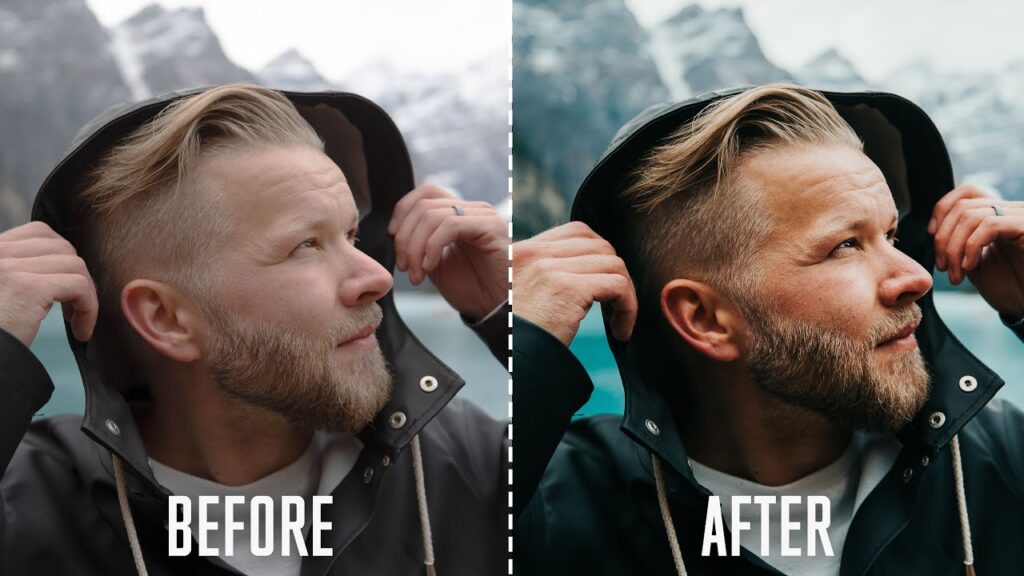
Photo editing is no longer just for professionals—it’s for everyone who wants their pictures to stand out. With so many editing apps available, it can feel overwhelming to find the right style for your photos. That’s where Snapseed QR Codes step in. These special codes store complete editing presets, letting you apply professional-level effects in just one scan. Instead of wasting time adjusting brightness, colors, and filters one by one, you can instantly transform your image with a single tap. Snapseed QR Codes are fast, creative, and perfect for both beginners and experts.
Why Snapseed QR Codes Are Changing Editing
Snapseed itself is already powerful, but QR Codes take it to another level. They act as shortcuts that capture every adjustment—like contrast, saturation, shadows, and tones—into a single scannable code. Think of them as ready-made “recipes” for editing. This means you can keep your editing style consistent, save time, and explore hundreds of new looks without having to experiment for hours.
Key Advantages of Snapseed QR Codes
| Advantage | What It Means for You | Example in Action |
| Instant Style | Apply complex edits in seconds | Scan a cinematic preset for moody vibes |
| Consistency | Keep the same look across all photos | Build a professional Instagram feed |
| Easy Sharing | Swap presets with friends or online | Share a vintage look QR with your group |
| Learning Tool | See what settings others use | Scan then study adjustments step by step |
| Creative Exploration | Discover styles you never tried before | Try pastel tones, black & white, or HDR |
How Snapseed QR Codes Work (Step by Step)
- Find a QR Code – Download one from online communities or get it from a friend.
- Open Snapseed – Select a photo you want to edit.
- Access QR Scan – Tap on the menu and choose “QR Look”.
- Scan the Code – Snapseed will read the preset and apply it instantly.
- Fine-Tune If Needed – You can still adjust brightness, tones, or crop after applying.
This simple process turns editing into a one-tap solution.
Tips & Tricks for Making the Most of Snapseed QR Codes
- Collect by Category – Save QR Codes for portraits, travel, food, and products separately. It makes your workflow smooth.
- Use Lighting Wisely – A preset looks different under poor lighting. Always start with a well-lit photo for the best effect.
- Mix Presets with Manual Edits – Don’t just rely on the preset. Add small tweaks to make it unique to your style.
- Stay Updated – New QR Codes keep trending online. Try them to stay ahead with fresh styles.
- Make Your Own Signature Code – Edit a photo, save it as a QR, and build your own brand identity through your presets.
Popular Types of Snapseed QR Codes
- Cinematic Looks – For moody, movie-like photos.
- Vintage & Retro – Old-school faded tones with warm colors.
- Bright & Pastel – Perfect for lifestyle and aesthetic photography.
- Moody Dark Tones – Great for portraits with dramatic lighting.
- High-Contrast HDR – Ideal for landscapes with lots of detail.
- Clean & Minimal – Subtle edits for a modern, natural look.
By experimenting with these styles, you can build a diverse portfolio of edits.
Creative Uses Beyond Social Media
Snapseed QR Codes are not only for Instagram posts. They can be powerful tools for:
- Business Branding – Keep product photos consistent with one style.
- Event Photography – Apply the same preset to wedding or party albums.
- Content Creators – Build a unique look that fans recognize instantly.
- Educational Purpose – Teachers and learners of photography can share QR Codes as editing lessons.
Conclusion
Snapseed QR Codes aren’t just shortcuts—they’re a complete upgrade to how you edit. They save time, maintain consistency, and open the door to endless creative possibilities. Whether you’re a casual editor, a social media creator, or even a professional photographer, these QR Codes give you results that look polished and professional. If you haven’t tried them yet, start exploring today and see how quickly your photos can stand out.
FAQs
Q1: Can I use Snapseed QR Codes on both Android and iOS?
Yes, Snapseed works on both platforms, and QR Codes function the same way. Just scan them within the app, and you’ll get identical results.
Q2: Do I need the internet to use Snapseed QR Codes?
No, once you have the QR Code saved in your gallery, you can scan it offline. Internet is only needed to download new codes.
Q3: Are Snapseed QR Codes safe?
Yes, they are completely safe. They only store editing settings like brightness and filters, not personal data.
Q4: How many Snapseed QR Codes can I save?
There’s no real limit—you can save as many as you like. The more you collect, the more editing options you’ll have.
Q5: Can I adjust the photo after applying a QR preset?
Definitely! Snapseed lets you edit further even after applying a preset. This means you can personalize every photo while still saving time.